Composite
Reducers are the way to aggregate data over time, space, bands, arrays and other data structures in Earth Engine. The ee.Reducer class specifies how data is aggregated. The reducers in this class can specify a simple statistic to use for the aggregation (e.g. minimum, maximum, mean, median, standard deviation, etc.), or a more complex summary of the input data (e.g. histogram, linear regression, list).
Reductions may occur over :
time (
imageCollection.reduce()),space (
image.reduceRegion(),image.reduceNeighborhood()),bands (
image.reduce()),attribute space of a
FeatureCollection** (featureCollection.reduceColumns()orFeatureCollectionmethods that start withaggregate_).
Consider the example of needing to take the median over a time series of images represented by an ImageCollection. To reduce an ImageCollection, use imageCollection.reduce(). This reduces the collection of images to an individual image. Specifically, the output is computed pixel-wise, such that each pixel in the output is composed of the median value of all the images in the collection at that location. To get other statistics, such as mean, sum, variance, an arbitrary percentile, etc., the appropriate reducer should be selected and applied.
Note
For basic statistics like min, max, mean, etc., ImageCollection has shortcut methods like min(), max(), mean(), etc. They function in exactly the same way as calling reduce(), except the resultant band names will not have the name of the reducer appended.
To composite images in an ImageCollection, use imageCollection.reduce(). This will composite all the images in the collection to a single image representing, for example, the min, max, mean or standard deviation of the images.
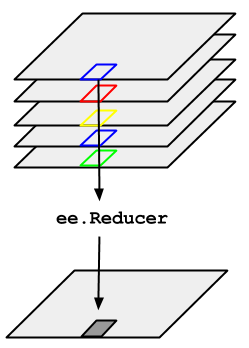
var startPeriod = '2019-01-01'
var endPeriod   = '2019-03-31'
var l8_composite = l8_filter
                  .filterDate(startPeriod, endPeriod)
                  .map(maskClouds)
                  .median()
                  .clip(roi)
Visualization
var visParams = {
  bands: ['SR_B4', 'SR_B3', 'SR_B2'],
  min: 0.0,
  max: 0.3,
}
Map.centerObject(roi, 8)
Map.addLayer(l8_composite, visParams, 'True Color (432) - Mask - Median')
Exportation to Google Drive
// Get projection of the original image
var projection = l8_filter.first().projection().getInfo()

// Export the image, specifying the CRS, transform, and region.
Export.image.toDrive({
  image: l8_composite,
  description: 'L8_2019_median_composite',
  folder: 'LBRAT2104',
  crs: projection.crs,                // The base coordinate reference system of this projection (e.g. 'EPSG:4326')
  crsTransform: projection.transform, // The transform between projected coordinates and the base coordinate system
  region: roi
});
Composite images created by reducing an image collection are able to produce pixels in any requested projection and therefore have no fixed output projection. Instead, composites have the default projection of WGS-84 with 1-degree resolution pixels. Composites with the default projection will be computed in whatever output projection is requested. A request occurs by displaying the composite in the Code Editor or by explicitly specifying a projection/scale as in an aggregation such as
ReduceRegionorExport.